
Magento is one of the most capable shop systems there is, and that is exactly why it so often runs in shops with many extensions, custom features and connections to ERP and warehouse systems. The flip side: every security patch has to be checked against all of that before it goes live. If that does not happen for a few months, a shop is suddenly several patches behind, and catching up feels like a project nobody has time for.
We are signundsinn, an e-commerce agency in Munich, and we have been looking after online shops since 2009. Here is how Magento's patch cycle works today, why shops fall behind and with which routine a small Magento shop stays up to date.
How Magento security patches work today
Monthly isolated patches. Adobe publishes security bulletins on a fixed day, usually the second Tuesday of the month. On top of that come isolated security patches: small packages that fix specific vulnerabilities for every supported version line. Two rules matter: you have to be on the latest patch release of your line (2.4.8-p5, for example), and you have to have applied all earlier monthly isolated patches first. They build on each other.
One full patch release per year. Once a year, in May, Adobe publishes a full patch for every supported line (the “-p” versions, such as 2.4.7-p10 or 2.4.8-p5 in May 2026). It bundles the isolated fixes of the past months. New minor versions also appear roughly once a year: 2.4.9 arrived in May 2026.
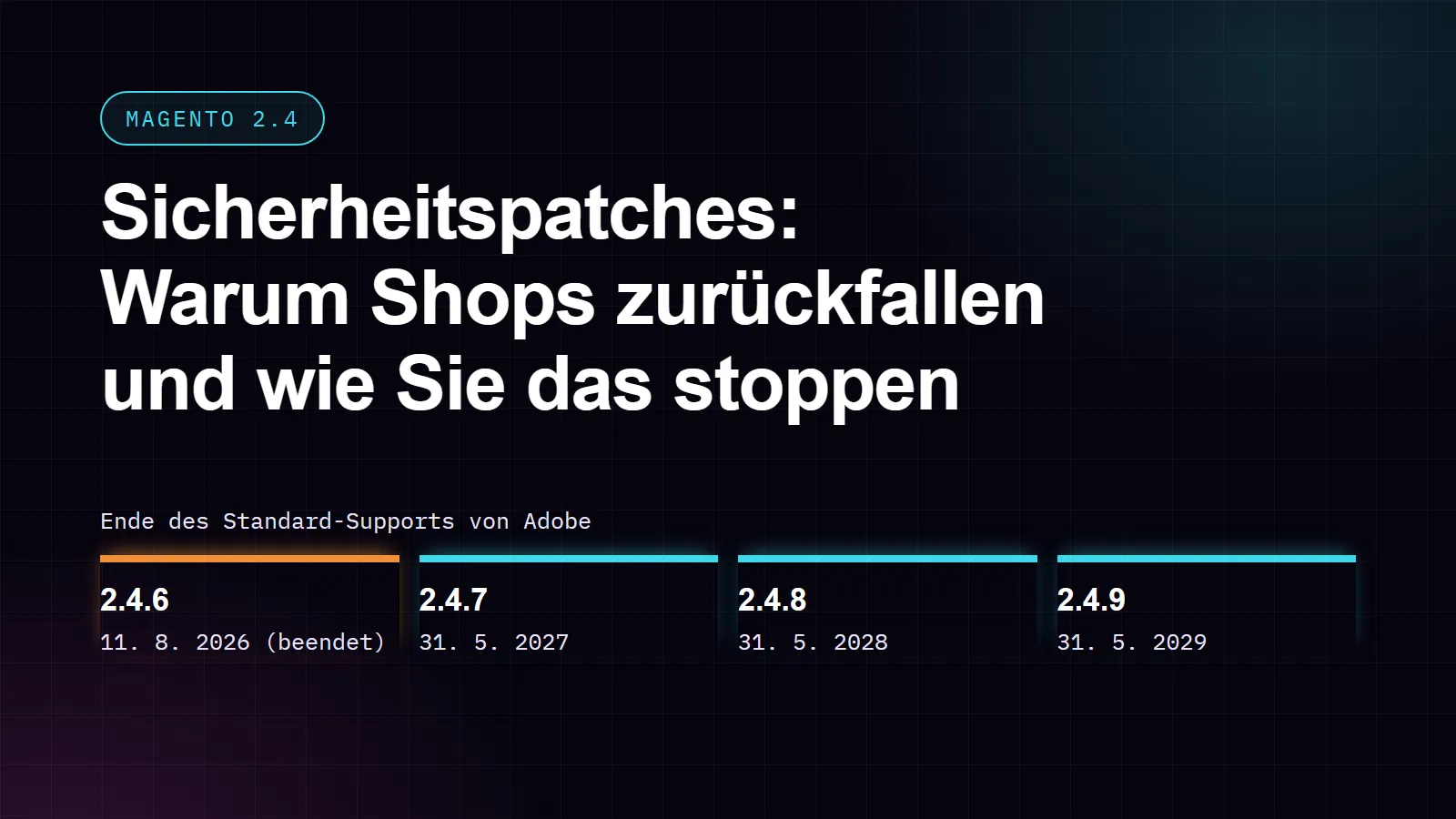
Version lines with an end date. Every 2.4 line has a limited support window. Adobe gives Adobe Commerce three years of standard support from release. For the lines most shops use today:
| Version line | Released | End of Adobe's standard support |
|---|---|---|
| 2.4.6 | March 2023 | 11 August 2026 (ended) |
| 2.4.7 | April 2024 | 31 May 2027 |
| 2.4.8 | April 2025 | 31 May 2028 |
| 2.4.9 | May 2026 | 31 May 2029 |
For some older lines Adobe offers Adobe Commerce customers extended support. That extension is part of Adobe Commerce. So if you run Magento Open Source on 2.4.6 or older, plan the move to 2.4.8 or 2.4.9 now, not when the next critical vulnerability becomes known.
PHP sets a second deadline. 2.4.6 supports PHP 8.1 and 8.2. PHP 8.1 no longer receives security updates, and PHP 8.2 receives its last security updates on 31 December 2026. 2.4.8 runs on PHP 8.3 and 8.4. For a 2.4.6 shop, the PHP version and the Magento version therefore run out at roughly the same time.
Why shops fall behind
1. Extensions have to keep up.
A typical Magento shop uses dozens of third-party extensions. A patch can change something an extension relies on, and the vendor may need time for a compatible version. Until then, the patch waits.
2. Custom code and the theme.
Custom features and theme adjustments make a shop unique, and they are exactly what has to be checked after every patch. The more customisation, the more testing.
3. The backlog grows.
Because the monthly patches build on each other, a skipped month does not save work, it only postpones it. Three skipped months mean three patches that have to be applied and tested, in the right order, plus the risk of operating with known vulnerabilities in the meantime.
4. Patches and upgrades get confused.
A patch (from 2.4.8-p4 to 2.4.8-p5, for example) is a contained security update. A jump between versions (from 2.4.6 to 2.4.8) is a real upgrade project, often with new requirements for PHP, the database or the search engine. Shops that have only done patches so far are often surprised by the scope of an upgrade and postpone it.
5. Nobody owns it.
The original agency has moved on, the freelancer is booked out, the in-house developer is stuck in feature requests. Patching is important but rarely urgent, until the day it is urgent.
A routine that keeps a small Magento shop up to date
Every month (after the security bulletin):
- Read the bulletin: which version lines are affected, and how critical is it?
- Apply the isolated patch on a copy of the shop (staging), together with all previous patches.
- Test what earns you money: search, product pages, cart, checkout with every payment method, customer account, order emails and the connections to your ERP or warehouse system.
- Back up, go live at a planned time, place a test order in the live shop.
Every quarter:
- Check extensions: are there updates, and does every vendor still support your version line?
- Compare your version line and PHP version against the end dates above.
- Remove extensions you no longer use.
Once a year (around the May release):
- Move to the new full patch release of your line.
- Decide when the next version jump happens and plan it as a project with time for testing, long before support for your line ends.
Before your strongest weeks: finish patching before the run-up to Black Friday (27 November this year) and Christmas, then agree on a change freeze, with one exception: critical security patches are still applied, tested on the copy first.
How much work is this?
A monthly isolated patch in a well-maintained shop, tested on a copy, is usually a matter of hours. The effort grows with the number of extensions, the amount of custom code and with every skipped month. A jump between version lines is a project: in our experience, updating the shop system takes between two weeks and more than a month, depending on the shop and how far behind it is.
How the Eywora AI Crew keeps Magento shops up to date
The Eywora AI Crew is our AI development crew, accompanied by our team, and it also works on Magento shops. Patching fits recurring tasks well: “apply the monthly Magento security patch”, for example. For every recurring task you choose how much the crew does on its own: only prepare the patch for your approval, take it as far as the copy of your shop within a budget limit, or run it fully automatically within that limit.
Every run follows the same process: the work happens on a copy of your shop, with automated tests and code review, and nothing goes live without your approval (unless you chose the automatic mode). There is a backup before every deployment, and our team can roll it back if something goes wrong. For a version jump the crew works in exactly the same way, as a normal task with an estimate you approve beforehand. The AI Crew is a monthly subscription plus AI usage per task, which you see as an estimate before the work starts.
The checklist to take with you
Sources
- Adobe Experience League, Monthly isolated security patching policy – https://experienceleague.adobe.com/en/docs/commerce-operations/release/planning/monthly-isolated-security-patches
- Adobe Experience League, Patch release schedule – https://experienceleague.adobe.com/en/docs/commerce-operations/release/planning/schedule
- Adobe Experience League, Adobe Commerce lifecycle policy – https://experienceleague.adobe.com/en/docs/commerce-operations/release/planning/lifecycle-policy
- Adobe Experience League, System requirements – https://experienceleague.adobe.com/en/docs/commerce-operations/installation-guide/system-requirements